Currently, you can attach PagerDuty Incidents, Opsgenie Alerts, GitHub Pull Requests, GitLab Merge Requests, Sentry tickets and Zendesk tickets to an incident. Attachments allows you to connect something from another system into incident.io. To attach something, you simply need to:
  1. Make sure you’re connected to the provider (e.g. GitHub) on the integration settings page
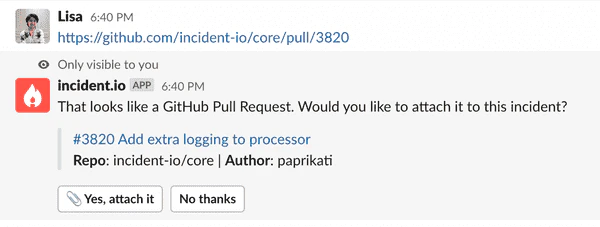
  2. Paste a link into an incident channel, like below
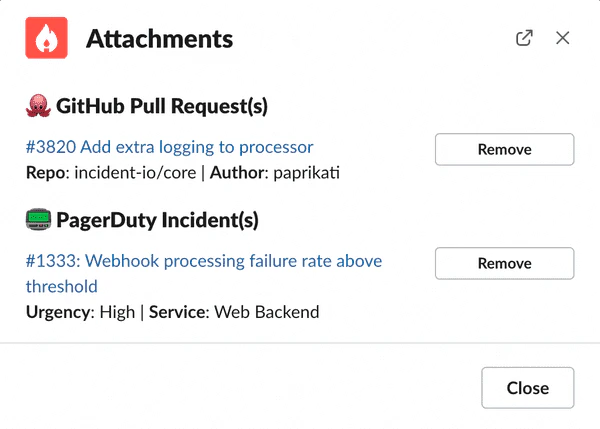
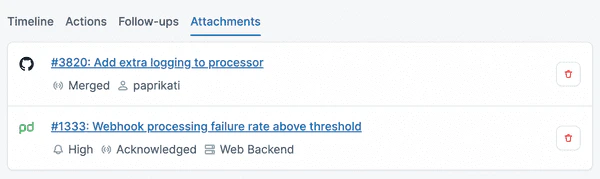
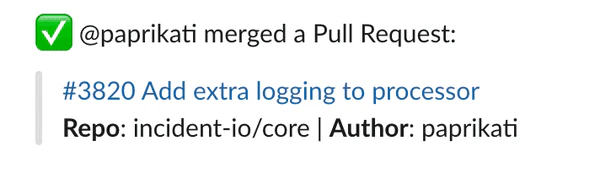
An image showing incident.io asking if you want to connect a GitHub PR. You can view attachments in Slack (via /incident attachments ) and in the Web UI: An image showing an attachment in Slack. An image showing an attachment in the web UI. Once it’s attached, we’ll help you out wherever we can. For example, if it’s a GitHub PR, we’ll comment on the PR (if it’s in a private repo) with a connection back to the incident, so it’s easy to find in the future: An image showing incident.io commenting on a GitHub Pull Request. Additionally, when a Pull Request gets closed or merged, we’ll let you know in the channel: An image showing incident.io notifying the incident channel when a PR is merged. To start using the feature, set up your integration and paste a link into an incident channel. We’ll do the rest!