

Live call routing isn’t available for numbers in Mainland China — none of our providers operate there for this. See
On-call in China for what’s supported.
Request a number
To get started, go to Settings → Call routes, click ’ Request number ’. Set a name for the number for your internal use - e.g. “Urgent support” or “Regulatory line”. Select the country code, phone number type and let us know any other requirements for the number, for example an area code. Depending on the type of phone number you’ve requested, you might have to enter additional information so we can provision your number. The form will take you through the required steps. Once you’ve requested a number and your information has been reviewed, we’ll get to work setting your number up. We’ll be in touch within a couple of days about any specific requests. If you already own a number in Twilio and can’t move it, you can bring your own Twilio number instead.Configure who to call
Calls to your phone number can be routed to the people currently on-call for a schedule, everyone on a schedule, specific individuals, or a mix of all three. On each level, we’ll try calling each person for 30 seconds. If they don’t pick up, we’ll try the next person. Once we’ve tried everyone on level 1, we’ll try the next level, until we run out of options — at which point we end the call, or send the caller to voicemail if you’ve added one. After you pick up, press 4 to accept the call. Until you do, the caller stays on hold with hold music.Configuring the call experience
You can also customize your call route:- Restrict who can call: choose Only specific phone numbers can call this number to limit calls to an allowlist.
- Set the voice language we use for spoken prompts and greetings. If you’d like a language that isn’t listed, please get in touch.
Route callers with a phone tree
Instead of sending every caller to the same people, present a phone tree (also known as an IVR menu) so callers can choose where their call goes — for example, “For urgent support, press 1. For billing, press 2.” A single number can then reach several teams, so you don’t need a separate number for each one. A phone tree with a single option also works as a simple “press 1 to connect” step, which helps filter out spam and accidental calls. To build a phone tree, edit a call route and turn on Use a phone tree (IVR). Add an option for each choice a caller can make:- Keypad digit: the number a caller presses to choose this option (1–9).
- Menu prompt: what we read out for this option (e.g., “For billing, press 2”). We speak this in the route’s voice language, exactly as written.
- Routing: who this option calls. Each option has its own routing, using the same routing options as a call route without a menu, and can end in voicemail.
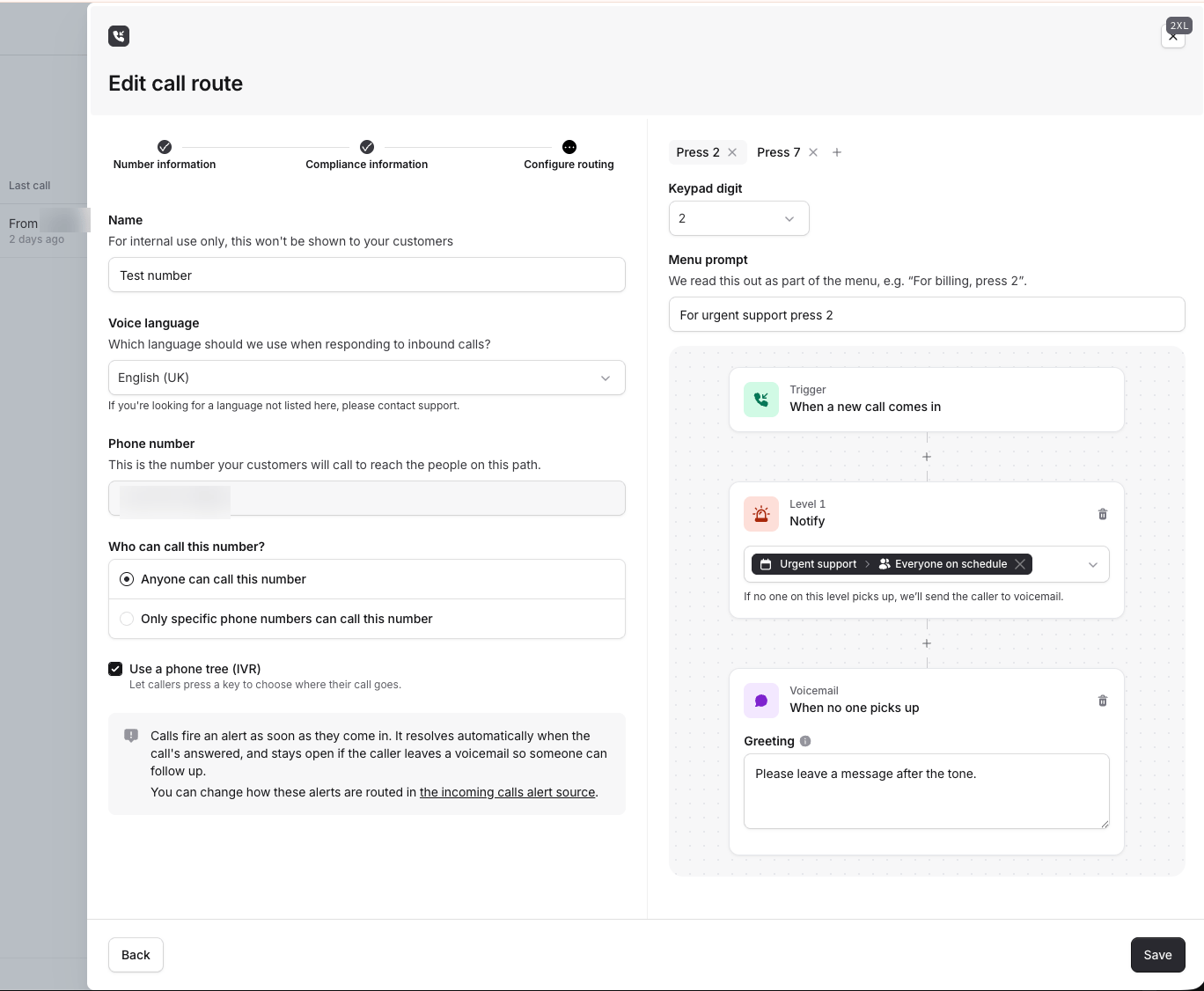
Send calls to voicemail
Call routes can send an incoming call to voicemail — either when none of your responders are available to answer, or by routing the call straight to voicemail without paging anyone. To add voicemail, edit a call route’s routing and choose Send to voicemail at the end of a path. Set a Greeting, which we read to the caller before recording their message. As with menu prompts, we read the greeting in the route’s voice language, exactly as written. Once the caller hangs up, we attach a recording of the voicemail to the call and to the alert it produces, and add a transcript a few minutes later. You can play the recording back from the alert in the dashboard. How voicemail affects the alert depends on how the call reached it:- Routed straight to voicemail: we don’t fire an alert until the call ends, so you’re only paged once there’s a message to listen to.
- Fell through to voicemail after no one answered: the alert fires when the call comes in, as usual.
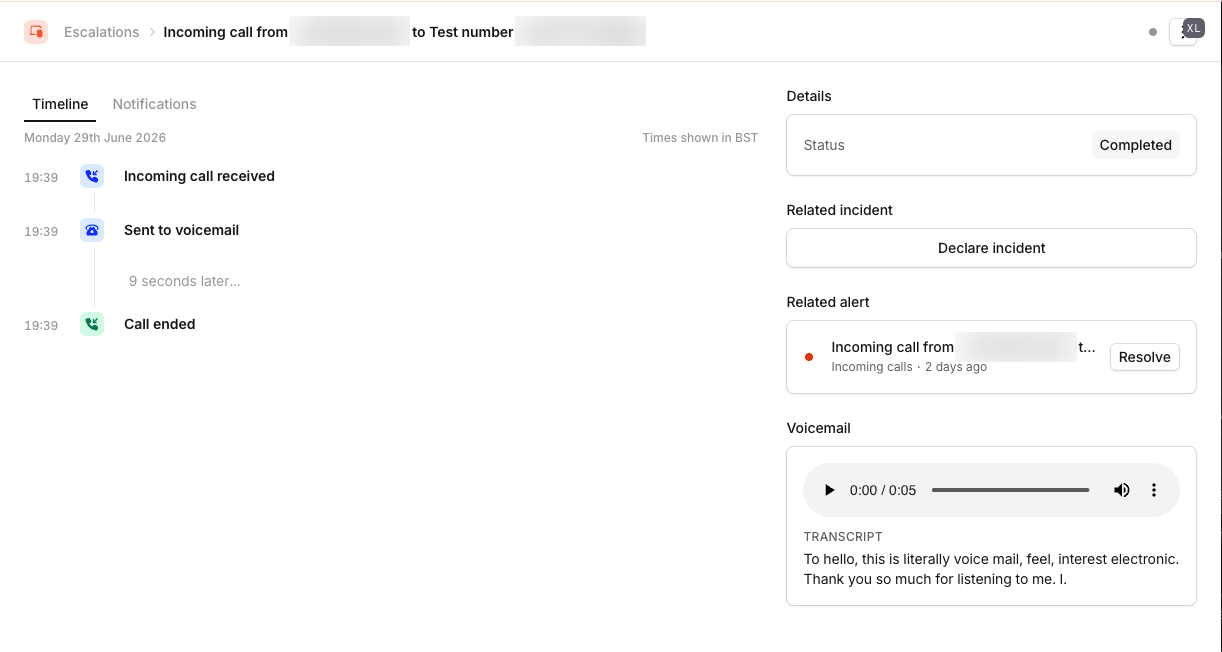
Creating an incident
Once you’ve requested your first live call routing number, a new ‘Incoming calls’ alert source will appear under On-call → Alert routing → Sources. You can use this to declare an incident whenever a call comes in. Anyone we route the call to will automatically be invited to the incident channel. Learn more about configuring alerts Note: Incoming call alerts resolve when the call ends, unless the caller left a voicemail — those stay open so someone can follow up. We recommend disabling ’ Decline triage incidents if the linked alerts are resolved ’ for alert routes using this source.FAQs
What does my customer see when calling me?
What does my customer see when calling me?
Your customer only sees the phone number we purchase on your behalf. If you have specific requirements for this number (e.g. a specific country or area code, a toll-free number), please let us know when requesting a number.
What will I see when I am being connected to a call?
What will I see when I am being connected to a call?
Calls routed to you come from your live call routing number by default. We recommend adding this number to your phone’s do-not-disturb bypass settings.Alternatively, a call route can be configured to call you from an incident.io On-call number. Our mobile app adds that to your contacts, but you won’t be able to tell which calls are to be connected to a live call and which are for an automated alert.After you answer, press 4 to accept the call. We don’t connect you to the caller until you do, so the caller keeps hearing hold music if you pick up and wait.
Is there an extra charge for live call routing?
Is there an extra charge for live call routing?
Please see our Pricing page for details on how many numbers are included on each of our plans. Anyone on a call route needs an On-call seat. Please get in touch with your customer success manager if you require more numbers.
What countries do you support for call route numbers?
What countries do you support for call route numbers?
All the countries we support are listed within the form. Some countries have regulatory requirements that your business will need to meet for us to be able to provision a number. If you’ve got a request for another type of number, please select “Other” for the country, write in your request details, and we’ll be in touch!
How long can a voicemail be?
How long can a voicemail be?
Up to five minutes. If a caller is still talking after that, we stop recording and process what we have.
Can I create call routes via the API?
Can I create call routes via the API?
It’s not currently possible to programmatically create call routes via the API. Call routes usually require us to collect some regulatory information to be set up, which doesn’t map well to an API.You can manage everything else about a route through the API:
- Call routes — list and show routes, and update a route’s name, voice language, who it pages, the number responders see, and whether the caller allowlist is enforced.
- Phone tree options — add, edit and remove options one at a time, rather than restating the whole menu.
- Allowed callers — add, relabel and remove the numbers that can call a route.