

What is heartbeat monitoring?
Heartbeat monitoring flips the usual alerting model: instead of your monitoring tool pushing an alert when something breaks, your service sends regular “I’m alive” pings to incident.io. If pings stop arriving within the expected window, an alert is fired to detect silent failures. This is useful for:- Cron jobs and scheduled tasks: know immediately if a job silently stops running
- Third-party integrations and service dependencies: catch failures in external systems before they show up on status pages
- Monitoring your monitoring stack: ensure Prometheus, AlertManager, or other tools are actually running and healthy
Create heartbeat
Go to Settings -> On-call -> Heartbeats and click Create new. Configure the following fields:- Name: identifies the service you’re monitoring. Create a separate heartbeat for each service or job you want to monitor independently.
- Interval: how often your service will ping. Must be between 1 second and 48 hours.
- Grace period or Missed tolerance: choose one to control how much leeway to allow before firing an alert:
- Grace period: fires an alert if a ping is late by more than the configured number of seconds. The combined interval and grace period cannot exceed 48 hours.
- Missed tolerance: fires an alert after the configured number of consecutive pings are missed (minimum 1). The interval multiplied by the threshold cannot exceed 48 hours.
- Priority: the priority for alerts fired by this heartbeat.
- Heartbeat owner (optional): the team responsible for this heartbeat.
Create heartbeat via Terraform
Use theincident_alert_source resource with source_type = "heartbeat" to manage heartbeats as code:
title and description fields in the template must be left empty — heartbeat alert sources manage these automatically.
Set up heartbeat pings
Copy the ping URL from the Ping endpoint section of your heartbeat. We support query string authentication or header authentication depending on your set up. Configure your service to send a GET or POST request to the ping URL at your chosen interval: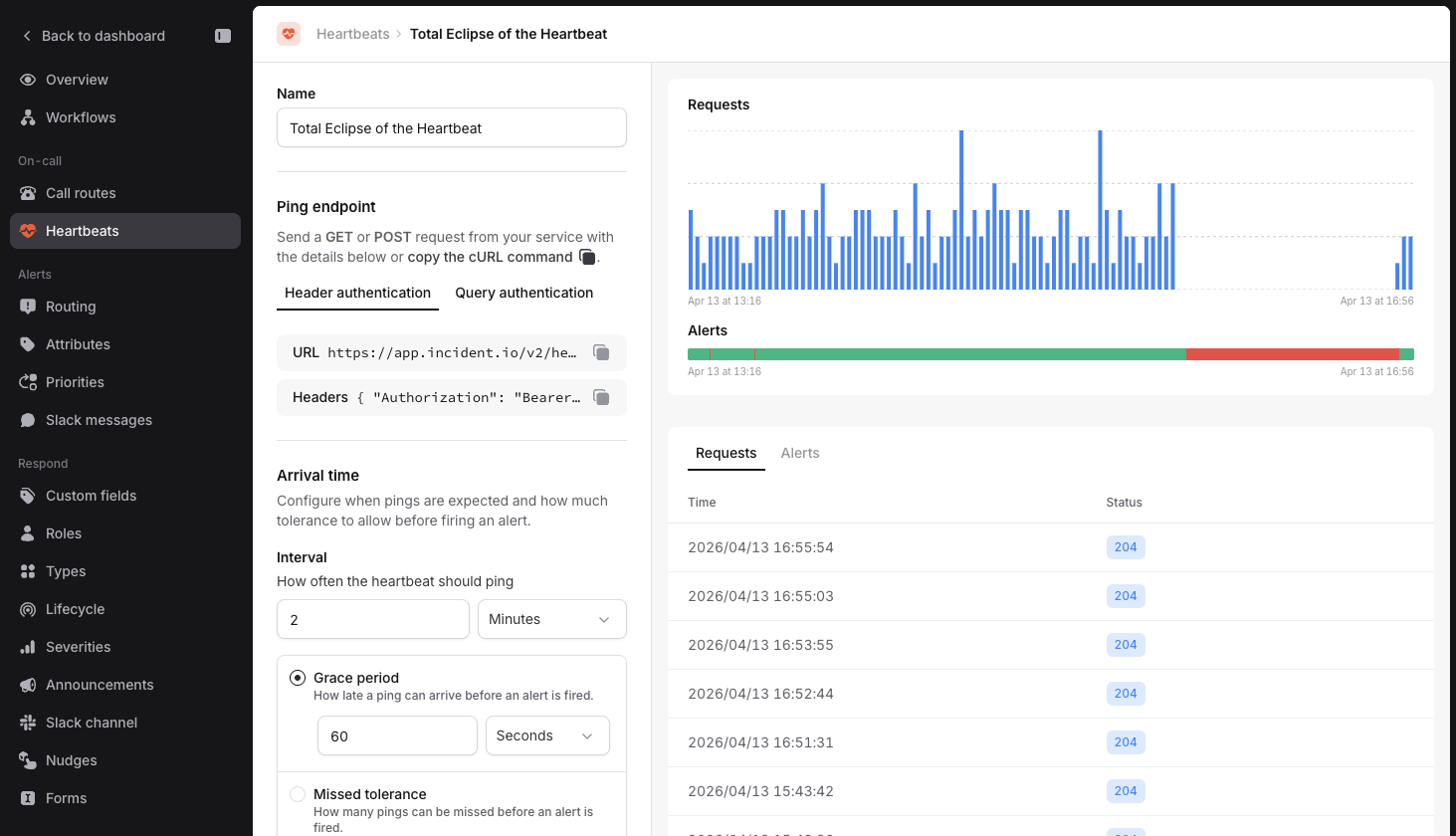
Choose a credential
A ping can authenticate with either of two credentials:- The heartbeat’s own secret token, shown in the Ping endpoint section. It works for that heartbeat only. Send it in the
Authorization: Bearerheader, or as a?token=query string parameter. - An API key with the Send heartbeat pings permission, which can ping every heartbeat in your organization. Send it in the
Authorization: Bearerheader only.
A heartbeat’s own secret token is separate from your API keys. Recreating the token from the Ping endpoint section does not affect any API key, and deleting an API key does not affect a heartbeat’s own token.
Alerting
When pings stop arriving, incident.io creates an alert. Each heartbeat is an alert source, so you can connect it to an alert route to control how alerts are routed to your on-call schedule. Check the heartbeat is healthy before connecting, otherwise your on-call could get paged before your service is up.