

- Replicating (and possibly automating) your existing processes in incident.io; and
- Embedding incident.io in your existing tool stack.
What does the incident.io API do?
At the highest level, our API lets you connect incident.io to any tool in your stack (or even to your own application), and give us instructions via that connection. Common use cases include:- Automatically creating an incident from another system, such as a monitoring tool like Datadog, or a ticketing system like Zendesk. See Declare incidents automatically from other tools
- Exporting incidents and follow-ups into a data warehouse or BI tool (Looker, Tableau etc.) to analyze. See Sync incident data into your data warehouse
- Managing your configuration as code, including custom fields, incident roles, severities, and catalog entries, for example using Terraform or Pulumi
- Creating escalations programmatically, triggering on-call escalation paths directly from external systems via the Escalations API
- Showing who’s on call in your own tools and scripts. See See who’s on call from your own tools
- Reporting engineering metrics, like MTTR and change failure rate, in tools like DX, Cortex, and Port. See Send incident data to your engineering metrics tools
Where can I find the API Keys?
You can create your API Keys from the API section of your incident.io Settings. See API keys for the permissions you can give each key.Example use case: declaring an incident from Zendesk
You might use a ticketing system like Zendesk (or Freshservice; or Intercom) to manage your customer support. Inbound tickets are typically triaged by customer support teammates, and escalated to engineering teams based on specific criteria (e.g. a certain severity, or a particular incident type such as data breaches). With our API, a support agent can declare an incident with one click, straight from within Zendesk. We’ll take care of the rest, from declaring the incident in incident.io to pulling in the right teammates, notifying the relevant internal and external stakeholders, spinning up your public Statuspage and much more. For when to use the API rather than an alert source, and how each one behaves, see Declare incidents automatically from other tools. Here are the few key steps to bringing this flow to life.- Generate an API Key in incident.io
Create incidents enabled. Keep this safe - we’ll need it in a minute.

- Add a Zendesk webhook as the action to take when the trigger fires
https://api.incident.io/v2/incidents. The API Key we generated earlier is used for Bearer token authentication. The request body needs to be JSON that looks like:
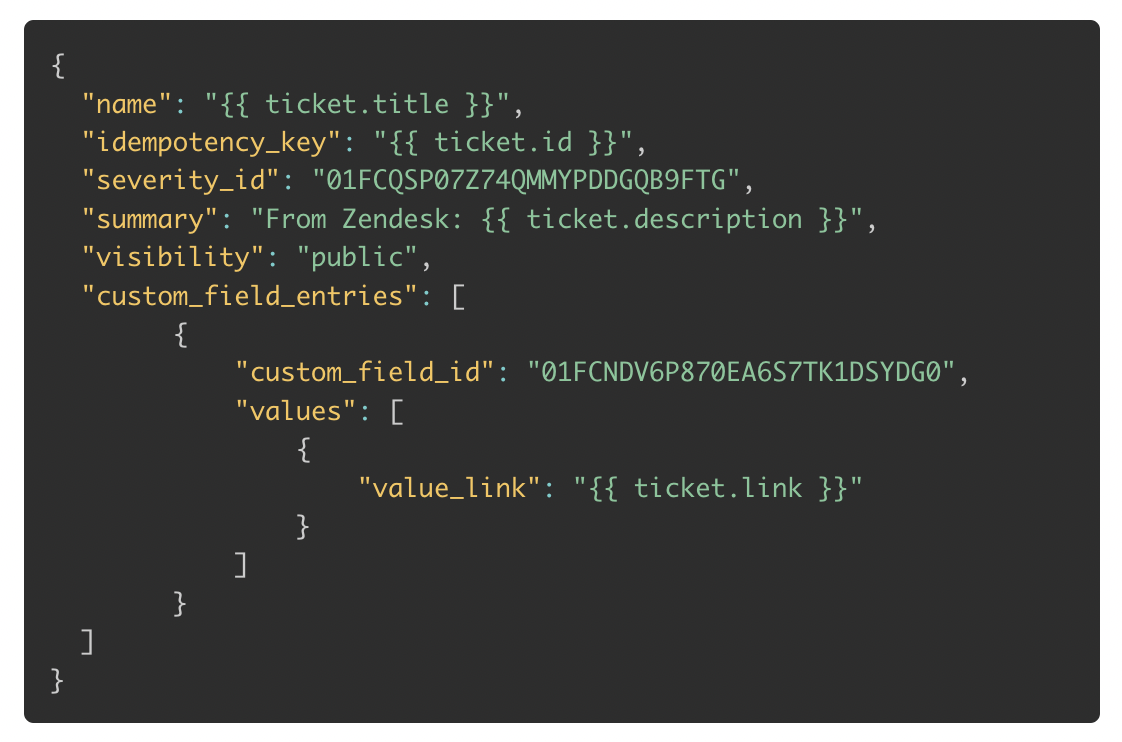
- The
custom_field_idreferences a “Zendesk Ticket Link” custom field we’ve configured. You can find the IDs of your custom fields using the List Custom Fields API. - The
severity_idreferences our “Minor” severity. You can find the IDs of your severities using the List Severities API.
idempotency_key, use the Zendesk ticket ID. If the webhook fires twice for the same ticket, you’ll get the same incident back rather than a duplicate.
That’s it! Whenever that trigger fires, you’ll get a new incident declared in Slack. Nice.
Even nicer: you can configure workflows that only run on your API-generated incidents.
For example, you could build a workflow that automatically adds the support agent that declared the incident in Zendesk to the incident’s Slack channel. To do that, add a condition based on the API Key creator. This would look like:

Exporting incident data to your warehouse
Data is always more powerful when you can link it together, which is why most organizations want to have all their different systems synced into a data warehouse where things can be analyzed in one place. With our API, you can get all your incident, action, and follow-up data out of incident.io and into your warehouse. There are three key APIs here: The follow-ups API supports filtering byupdated_at, so you can fetch only what changed since your last sync instead of re-fetching everything. See our guide to syncing follow-ups for the full recipe. Once the data is in your warehouse you can link it with any other data there. If you have your Jira data there you can link follow-ups in incident.io with the corresponding ticket in Jira, for example.
For the full picture, including Fivetran, our Singer tap, and incremental syncs for every endpoint, see Sync incident data into your data warehouse.
Keeping in sync with your service catalog
One of the most common uses of custom fields is to tag incidents with which teams and services were involved. You can keep those lists in sync with your service catalog, using the Custom Field Options API. This API lets you manage options for any custom field. Beyond custom fields, you can also manage custom Incident Roles and Severities using the API, if you want to keep all your configuration in a central location, for example using Terraform. To bring your services and teams into the Catalog itself, see How do I get data into Catalog?Over to you!
We’d love to hear what you build with our API. There’s an#api channel in the incident.io Community, or reach out to our support team at help@incident.io.