> ## Documentation Index
> Fetch the complete documentation index at: https://docs.incident.io/llms.txt
> Use this file to discover all available pages before exploring further.
# Asking for confirmation before a workflow runs
> Have a workflow ask in the incident channel before it runs, and optionally collect a form from whoever approves it.
Some workflows are useful most of the time, but not always: paging another team, posting to a customer channel, or changing an incident's severity. Instead of making them manual, you can have the workflow ask first. When it matches, a prompt is posted in the incident channel, and the workflow only runs once someone approves it.
## Turning on confirmation
In the workflow editor, find **And runs automatically** under the trigger and click **Ask first**. It changes to **Then asks for confirmation in the incident channel**.
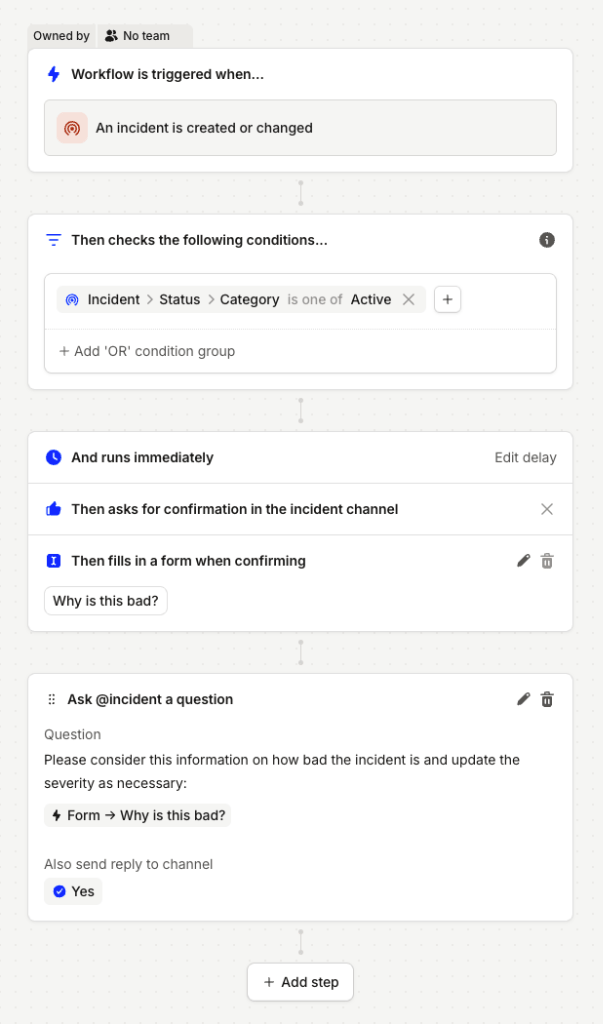 Confirmation works for workflows whose trigger is about a single incident. It isn't available for manually-triggered workflows, since running one by hand is already a confirmation.
## What happens when the workflow matches
When the trigger fires and the conditions match, a message is posted in the incident channel asking whether to run the workflow, with **Run** and **Dismiss** buttons. Nothing runs until someone answers.
Confirmation works for workflows whose trigger is about a single incident. It isn't available for manually-triggered workflows, since running one by hand is already a confirmation.
## What happens when the workflow matches
When the trigger fires and the conditions match, a message is posted in the incident channel asking whether to run the workflow, with **Run** and **Dismiss** buttons. Nothing runs until someone answers.

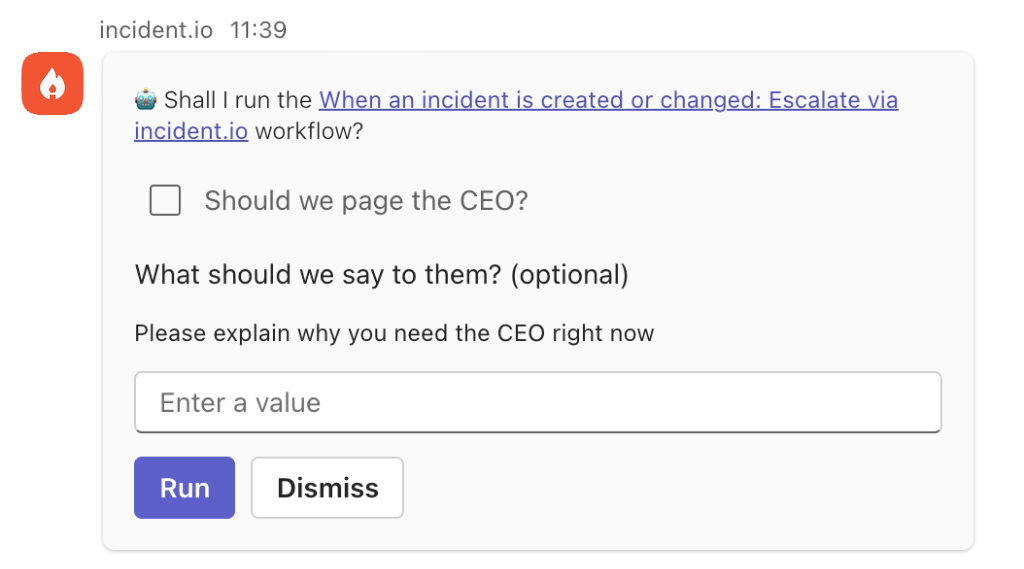 * **Run** checks the conditions again, then runs the workflow's steps. The message updates to show it's running.
* **Dismiss** cancels the run, and the message updates to say so.
Only people who can see the incident can answer the prompt, and the first answer wins.
A prompt is cancelled without running if:
* nobody answers it within 24 hours,
* the incident is declined, canceled or merged, or
* the workflow's conditions stop applying before anyone answers.
The message updates to explain why the workflow didn't run. Every outcome appears in the workflow's **Activity**.
## Collecting a form when someone approves
A workflow that asks for confirmation can also have a form, just like a manually-triggered workflow. Steps can use the answers in the same way as other variables.
Clicking **Run** opens the form, and the workflow runs when it's submitted.
* **Run** checks the conditions again, then runs the workflow's steps. The message updates to show it's running.
* **Dismiss** cancels the run, and the message updates to say so.
Only people who can see the incident can answer the prompt, and the first answer wins.
A prompt is cancelled without running if:
* nobody answers it within 24 hours,
* the incident is declined, canceled or merged, or
* the workflow's conditions stop applying before anyone answers.
The message updates to explain why the workflow didn't run. Every outcome appears in the workflow's **Activity**.
## Collecting a form when someone approves
A workflow that asks for confirmation can also have a form, just like a manually-triggered workflow. Steps can use the answers in the same way as other variables.
Clicking **Run** opens the form, and the workflow runs when it's submitted.
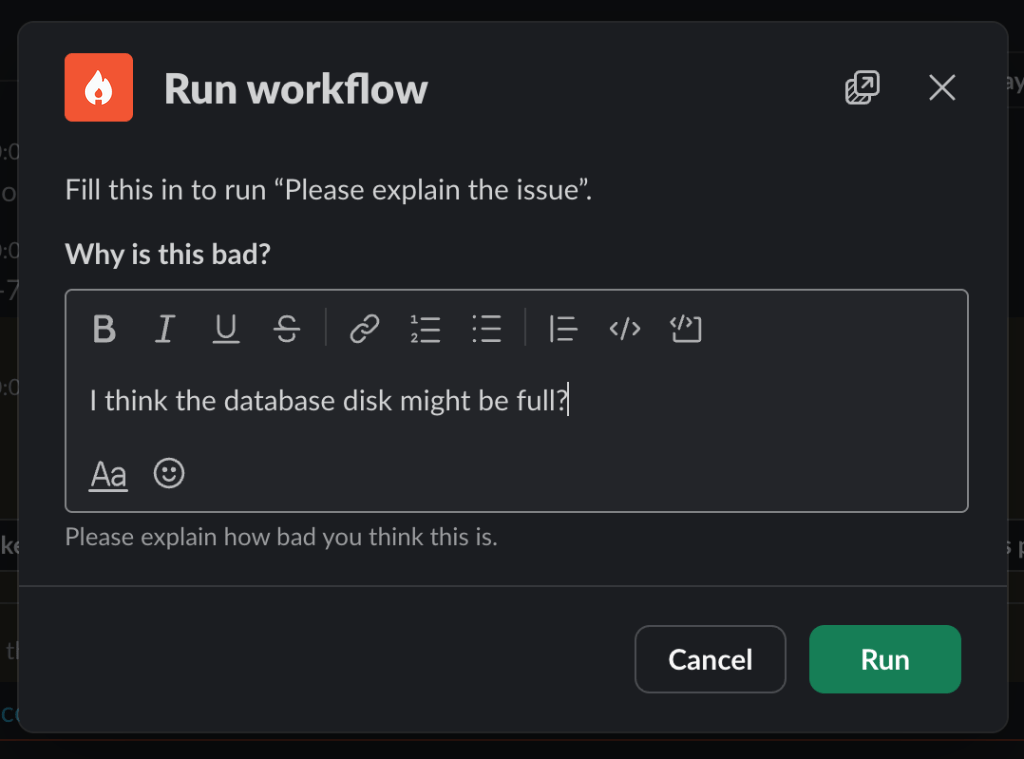 The form is shown on the prompt itself. Fill it in, then click **Run**.
The prompt can show text and checkbox fields. Other optional fields are left out. If the form has a required field that Teams can't show, the workflow is cancelled instead of asking.
Conditions, [How often should this workflow run?](/workflows/advanced#how-often-should-this-workflow-run) and [loops](/workflows/loops) are decided before the form is filled in. So they can't use the form's answers, or expressions built from them. The workflow editor only offers them where they can be used.
To turn confirmation off, remove the form first.
The form is shown on the prompt itself. Fill it in, then click **Run**.
The prompt can show text and checkbox fields. Other optional fields are left out. If the form has a required field that Teams can't show, the workflow is cancelled instead of asking.
Conditions, [How often should this workflow run?](/workflows/advanced#how-often-should-this-workflow-run) and [loops](/workflows/loops) are decided before the form is filled in. So they can't use the form's answers, or expressions built from them. The workflow editor only offers them where they can be used.
To turn confirmation off, remove the form first.