> ## Documentation Index
> Fetch the complete documentation index at: https://docs.incident.io/llms.txt
> Use this file to discover all available pages before exploring further.
# How do I assign on-call roles from schedules to incident roles?
## Context
When managing multiple on-call schedules with different roles (like Incident Manager, Incident Commander, DevOps), you may want to automatically assign the current on-call person from each schedule to their corresponding incident role when an incident is created.
## Answer
You can automatically assign on-call members to incident roles using a workflow with custom expressions. Here's how to set it up:
1. Create a new workflow or edit an existing one
2. Use the "assign an incident role to user" for any role you wish to set in the workflow
3. For each role you want to assign, use the following expression:
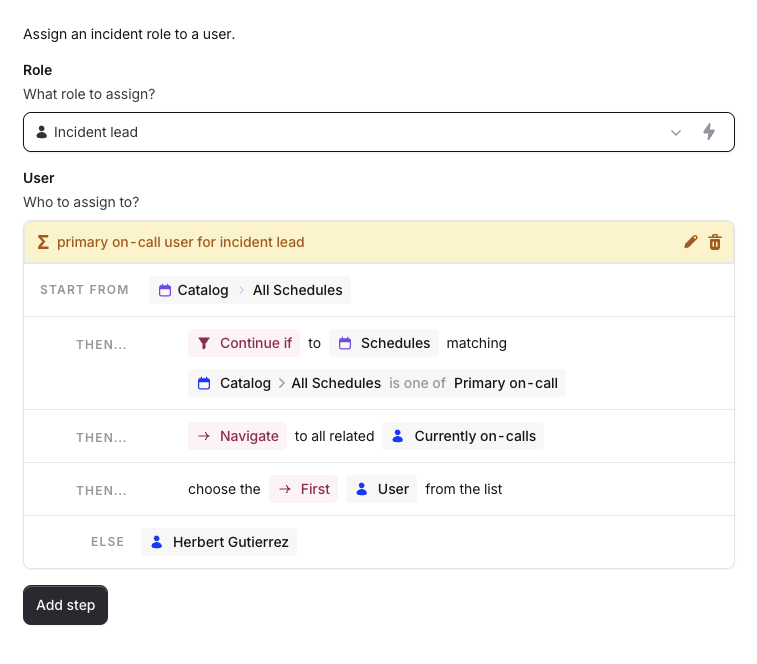 Make sure to use the exact schedule name in the expression to target the specific on-call schedule
This allows you to pick the current on-call user on a schedule and assign them to a specific role.
Example setup:
**Alternative Approach:** You can also use the "Auto-assign incident lead" [template workflow](https://app.incident.io/~/workflows/create?template=assign_paged_as_lead) to set roles based on who acknowledges an escalation. This is useful when you want to ensure the assigned person has actually acknowledged the incident.
Make sure to use the exact schedule name in the expression to target the specific on-call schedule
This allows you to pick the current on-call user on a schedule and assign them to a specific role.
Example setup:
**Alternative Approach:** You can also use the "Auto-assign incident lead" [template workflow](https://app.incident.io/~/workflows/create?template=assign_paged_as_lead) to set roles based on who acknowledges an escalation. This is useful when you want to ensure the assigned person has actually acknowledged the incident.