> ## Documentation Index
> Fetch the complete documentation index at: https://docs.incident.io/llms.txt
> Use this file to discover all available pages before exploring further.
# Reassigning escalation paths
> Hand an unacknowledged escalation to another path automatically.
The **Reassign** step hands an escalation from one escalation path to another on its own, without any user intervention. The original escalation stops and a new one starts on the target path, running it from the first step.
Use it to define common fallback paths instead of rebuilding the same fallback levels across several paths. A team path can hand off to a wider group path, which hands off in turn to a follow-the-sun path, and you maintain each one in one place.
## How it works
When an escalation reaches a Reassign step:
1. The current escalation stops, with a status of **Expired**, because nobody acknowledged it.
2. A new escalation starts on the target path, from its first step.
3. The two are linked, so you can move between them from either one.
The new escalation runs the target path's own levels and branches. Those branches are evaluated when the handoff happens, not when the original escalation started, so a handoff that lands after hours takes the target path's out-of-hours branch even though the original was paged during the working day.
## Add a Reassign step
1. Open an escalation path and click the + icon at the end of the path, or at the end of a branch.
2. Select **Reassign to another path**.
3. Choose the escalation path to reassign to.
4. Save the escalation path.
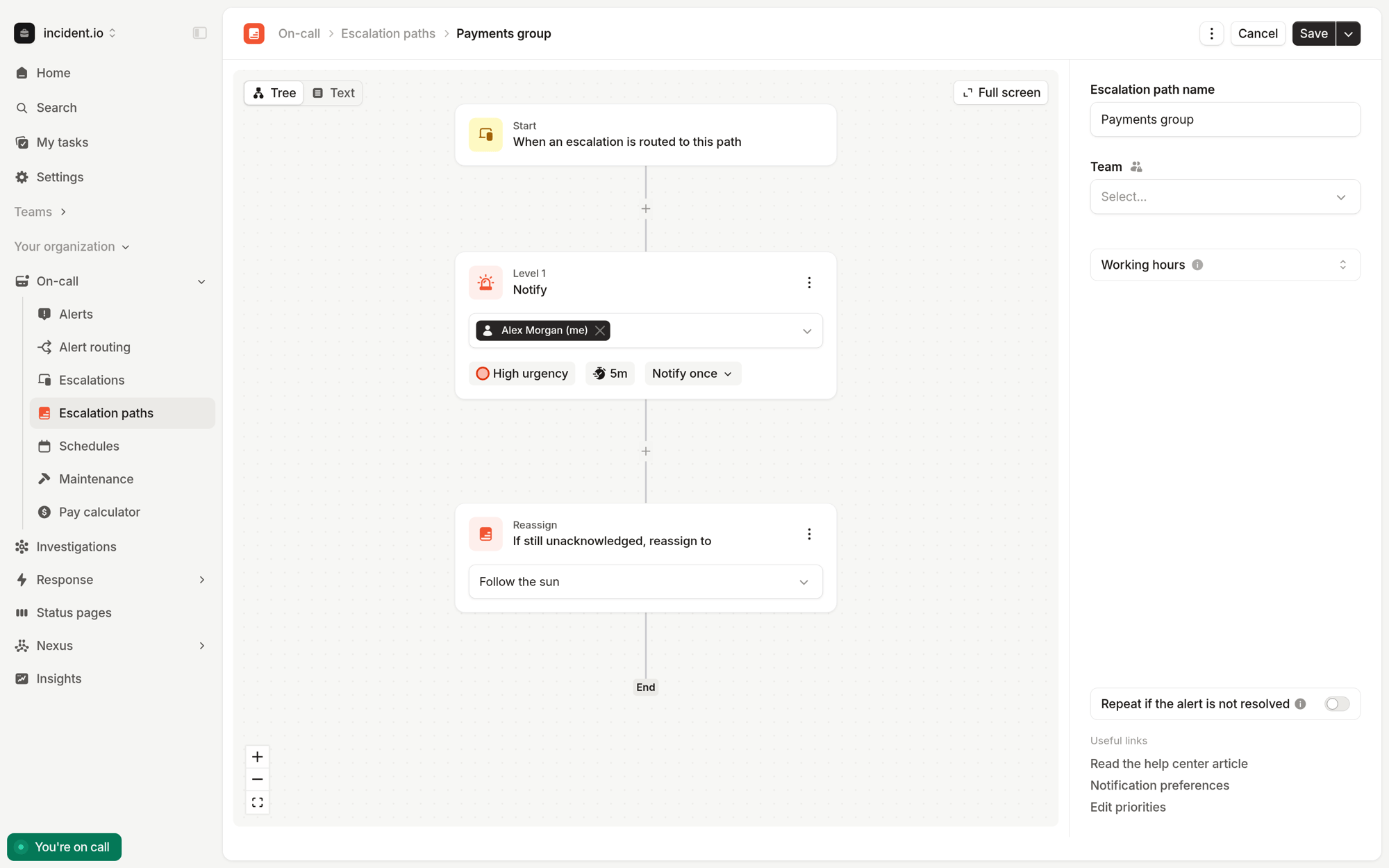 A Reassign step ends the path, so nothing can follow it. You can put one after a [Retry node](/on-call/escalation-paths#retry-across-the-path), so a path retries itself a few times before handing over.
## Following a reassignment
The escalation timeline names the target path and links to the new escalation, and the new escalation links back.
A Reassign step ends the path, so nothing can follow it. You can put one after a [Retry node](/on-call/escalation-paths#retry-across-the-path), so a path retries itself a few times before handing over.
## Following a reassignment
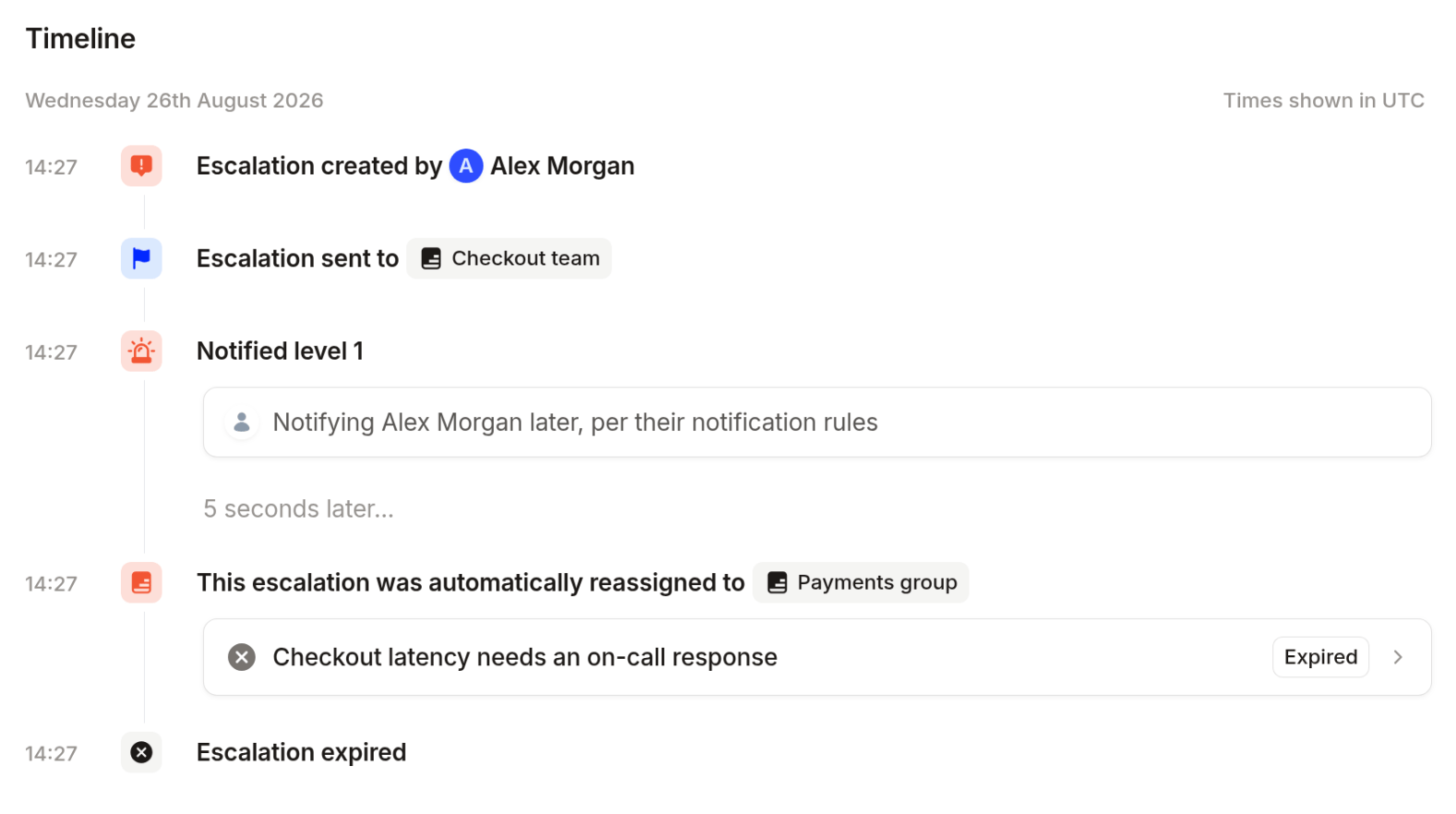
The escalation timeline names the target path and links to the new escalation, and the new escalation links back.
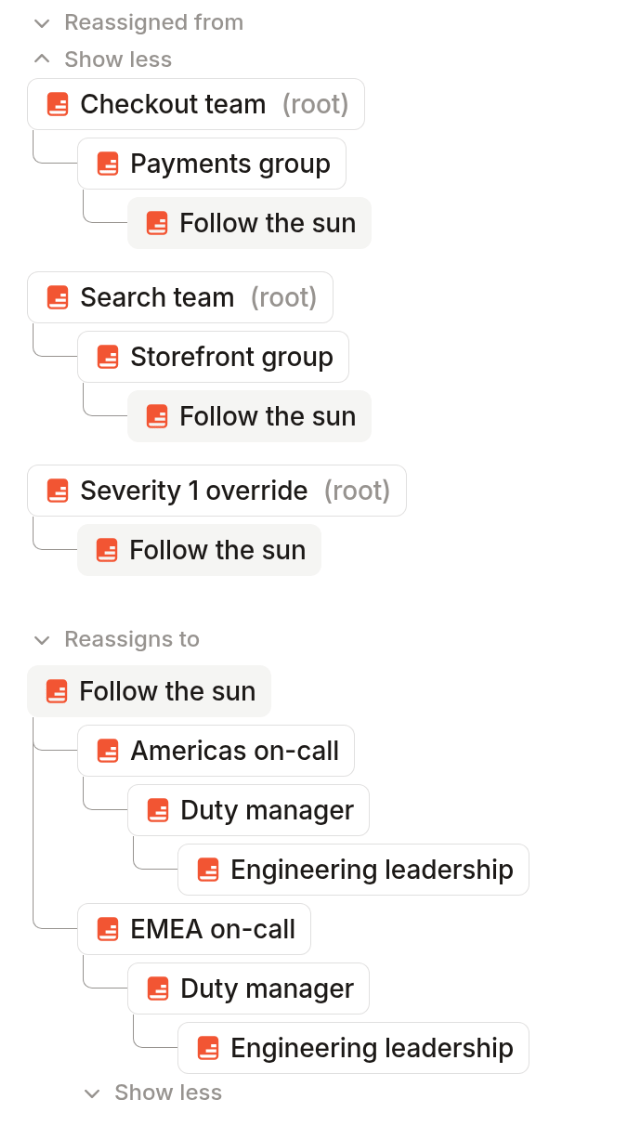
 On the escalation path itself, the sidebar shows **Reassigns to** and **Reassigned from**, so you can see how path reassignments flow into one another.
 ## Limits
* There can be no more than 10 consecutive reassignments from the first escalation path. Escalation path configuration that results in more than 10 reassignments is permitted at save time, but escalations will ignore further reassignments and expire after 10 reassignments have occurred.
* You can't archive an escalation path while another path still reassigns to it.
Previews of who is on call stop at a Reassign step, so a path that ends in a handoff previews its own responders
rather than the target path's.
## Reassigning manually
You can also reassign a live escalation manually. That resolves the original escalation rather than expiring it, and it happens because someone chose to, not because the path was built that way. See [Reassigning escalations](/on-call/reassigning-escalations) and [escalation statuses](/on-call/escalation-statuses).
## FAQs
Not from a single step. Branch on priority or working hours first, then add a Reassign step to the end of each
branch.
## Limits
* There can be no more than 10 consecutive reassignments from the first escalation path. Escalation path configuration that results in more than 10 reassignments is permitted at save time, but escalations will ignore further reassignments and expire after 10 reassignments have occurred.
* You can't archive an escalation path while another path still reassigns to it.
Previews of who is on call stop at a Reassign step, so a path that ends in a handoff previews its own responders
rather than the target path's.
## Reassigning manually
You can also reassign a live escalation manually. That resolves the original escalation rather than expiring it, and it happens because someone chose to, not because the path was built that way. See [Reassigning escalations](/on-call/reassigning-escalations) and [escalation statuses](/on-call/escalation-statuses).
## FAQs
Not from a single step. Branch on priority or working hours first, then add a Reassign step to the end of each
branch.