> ## Documentation Index
> Fetch the complete documentation index at: https://docs.incident.io/llms.txt
> Use this file to discover all available pages before exploring further.
# Declaring incidents
Declaring an incident takes seconds, and you can do it right from where your team already works, whether that's Slack or Microsoft Teams.
You can declare three types of incident: a **live** incident for something happening right now, a [**retrospective**](/incidents/retrospective-incidents) incident to document something that already happened, and a [**test**](/incidents/test-incidents) incident to practice without affecting production.
Whichever type you declare, the form is fully customizable, so your team captures exactly the context it needs. See [incident forms](/admin/incident-forms) to tailor which fields appear.
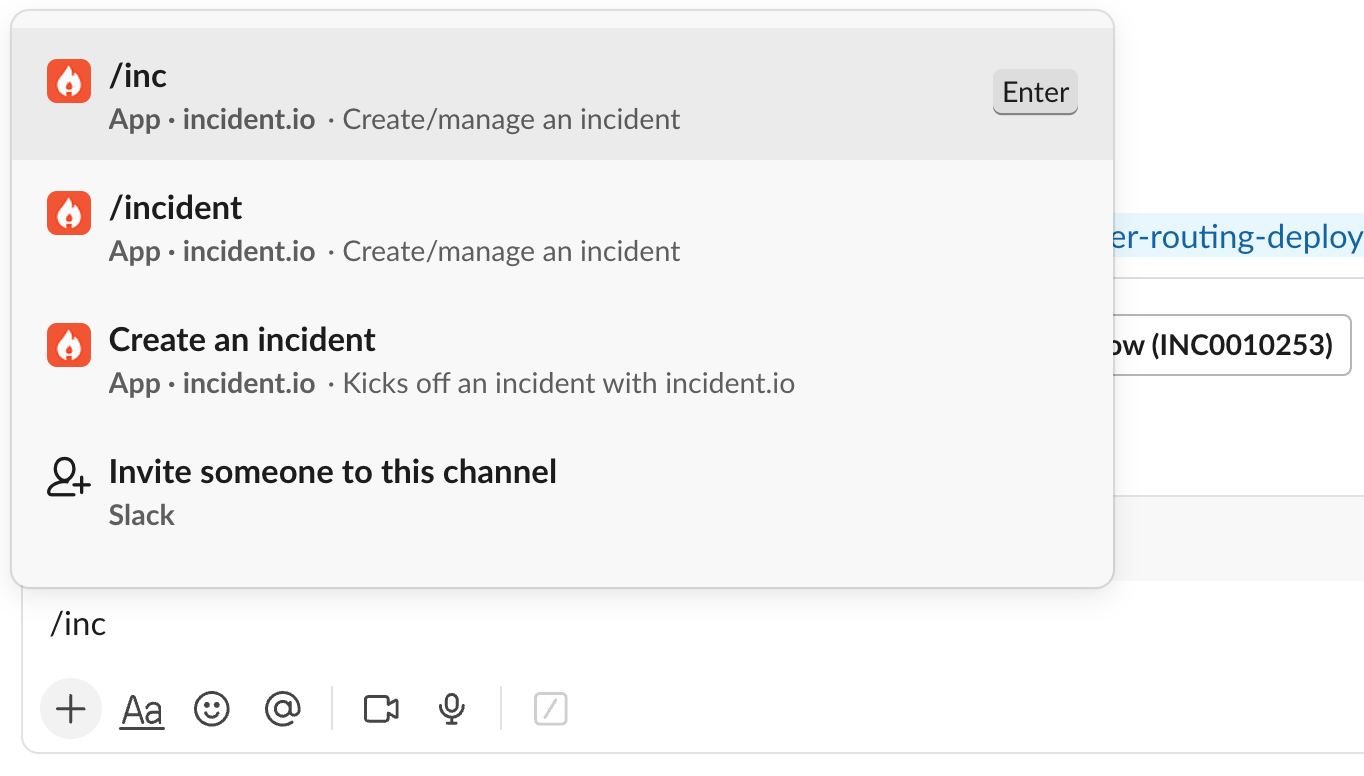
#### Declare with /incident or /inc
From any channel in Slack, type `/incident` or `/inc` and press `Enter` to open the incident declaration form. To pre-fill the title, add it after the command (e.g. `/inc Website is down`).
 #### Declare from an existing message
Sometimes the first sign of an incident is a message that's already been posted, such as a report in your `#customer-support` or `#legal` channel, a heads-up in a Slack Connect channel with a customer, or a direct message from a colleague. You can declare an incident straight from that message so the context comes with it.
Click the three dots in the top-right corner of the message, choose **Connect to apps**, then **Create an incident**.
#### Declare from an existing message
Sometimes the first sign of an incident is a message that's already been posted, such as a report in your `#customer-support` or `#legal` channel, a heads-up in a Slack Connect channel with a customer, or a direct message from a colleague. You can declare an incident straight from that message so the context comes with it.
Click the three dots in the top-right corner of the message, choose **Connect to apps**, then **Create an incident**.
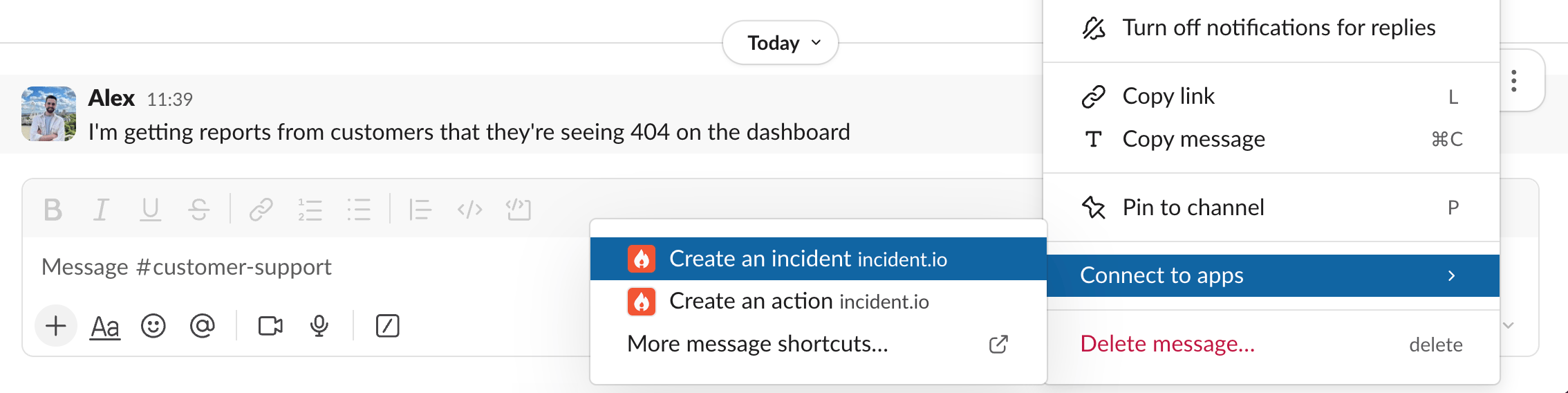 If you don't see it, choose **More message shortcuts** from the same menu.
#### Declare from your browser
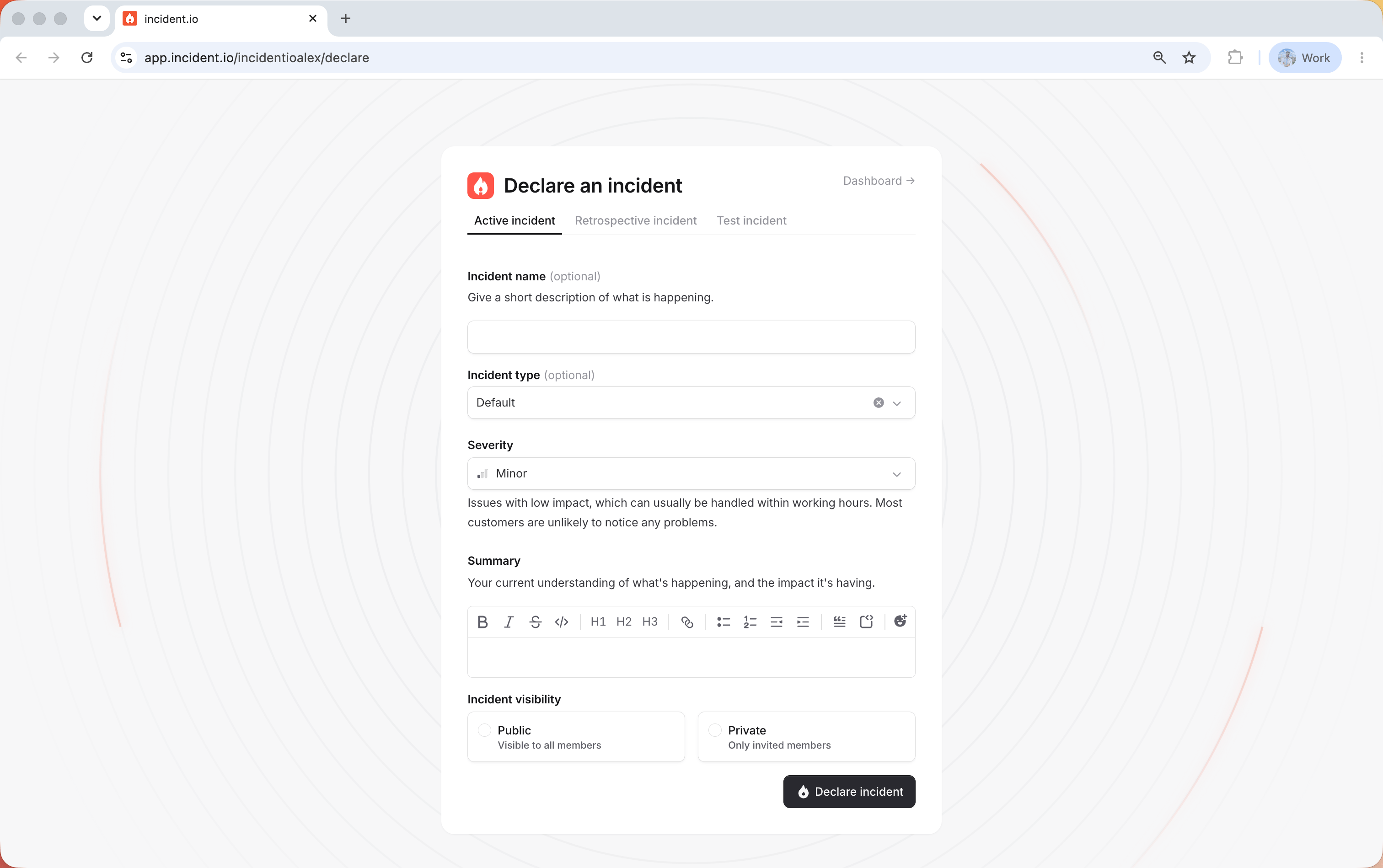
Head to [inc.new](https://inc.new) to create a new incident. Fill out the details and hit **Declare**, just as if you'd used the slash command. You can switch between live, retrospective, and test incidents from the tabs at the top of the form.
If you don't see it, choose **More message shortcuts** from the same menu.
#### Declare from your browser
Head to [inc.new](https://inc.new) to create a new incident. Fill out the details and hit **Declare**, just as if you'd used the slash command. You can switch between live, retrospective, and test incidents from the tabs at the top of the form.
 #### What happens next
As soon as you declare, we automatically set up your incident response workspace:
* A dedicated Slack channel that brings responders, updates, and actions together in one place.
* A [video call](/incidents/video-calls) for a digital war room, using Google Meet, Zoom, or another provider.
* A linked ticket in your issue tracker, like [Jira](/integrations/jira) or [Linear](/integrations/linear), keeping the work visible where your engineers already are.
* A heads-up in your announcements channel, `#incidents` by default.
From there, [workflows](/workflows/getting-started) automate the rest of your process, like assigning roles, posting status updates, and more.
#### Declare from the incident.io tab
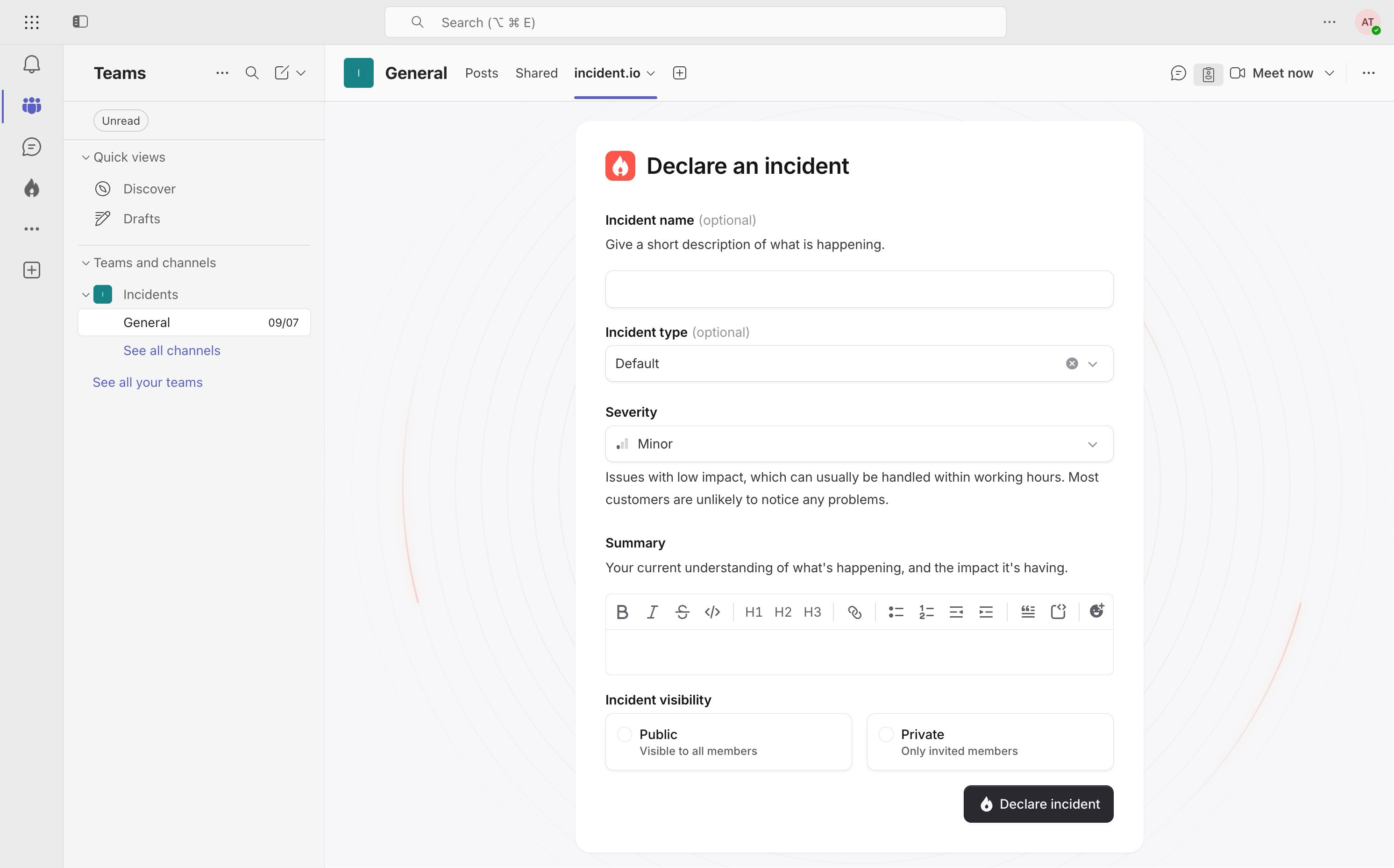
To declare an incident, open the incident.io tab, fill out the form, and hit **Declare**. You'll usually find this tab in the **General** channel of your **Incidents** team, which we [create automatically](/getting-started/installing-teams) at install. It's also available in any other channel the app has been added to.
#### What happens next
As soon as you declare, we automatically set up your incident response workspace:
* A dedicated Slack channel that brings responders, updates, and actions together in one place.
* A [video call](/incidents/video-calls) for a digital war room, using Google Meet, Zoom, or another provider.
* A linked ticket in your issue tracker, like [Jira](/integrations/jira) or [Linear](/integrations/linear), keeping the work visible where your engineers already are.
* A heads-up in your announcements channel, `#incidents` by default.
From there, [workflows](/workflows/getting-started) automate the rest of your process, like assigning roles, posting status updates, and more.
#### Declare from the incident.io tab
To declare an incident, open the incident.io tab, fill out the form, and hit **Declare**. You'll usually find this tab in the **General** channel of your **Incidents** team, which we [create automatically](/getting-started/installing-teams) at install. It's also available in any other channel the app has been added to.
 #### Declare from your browser
Head to [inc.new](https://inc.new) to create a new incident. Fill out the details and hit **Declare**, just as if you'd used the incident.io tab. You can switch between live, retrospective, and test incidents from the tabs at the top of the form.
It's also a great way to let people across your organization declare an incident without needing access to the Incidents team.
#### What happens next
As soon as you declare, we automatically set up your incident response workspace:
* A dedicated Teams channel that brings responders, updates, and actions together in one place.
* A [video call](/incidents/video-calls) for a digital war room, using Microsoft Teams, Zoom, or another provider.
* A linked ticket in your issue tracker, like [ServiceNow](/integrations/servicenow), keeping the work visible where your engineers already are.
* A heads-up in your announcements channel, the **General** channel of your Incidents team by default.
From there, [workflows](/workflows/getting-started) automate the rest of your process, like assigning roles, posting status updates, and more.
## FAQs
By default, anyone can declare an incident. Admins can [restrict who can declare a particular incident
type](/admin/role-restrictions), for example limiting a security incident to your security team.
You can configure which fields are required and which are optional, so an incident can be declared with just a few
details. Anything filled in is easy to change later during the incident.
Yes, if private incidents are enabled for your workspace. The declaration form will include an option to make the
incident private, visible only to invited responders.
#### Declare from your browser
Head to [inc.new](https://inc.new) to create a new incident. Fill out the details and hit **Declare**, just as if you'd used the incident.io tab. You can switch between live, retrospective, and test incidents from the tabs at the top of the form.
It's also a great way to let people across your organization declare an incident without needing access to the Incidents team.
#### What happens next
As soon as you declare, we automatically set up your incident response workspace:
* A dedicated Teams channel that brings responders, updates, and actions together in one place.
* A [video call](/incidents/video-calls) for a digital war room, using Microsoft Teams, Zoom, or another provider.
* A linked ticket in your issue tracker, like [ServiceNow](/integrations/servicenow), keeping the work visible where your engineers already are.
* A heads-up in your announcements channel, the **General** channel of your Incidents team by default.
From there, [workflows](/workflows/getting-started) automate the rest of your process, like assigning roles, posting status updates, and more.
## FAQs
By default, anyone can declare an incident. Admins can [restrict who can declare a particular incident
type](/admin/role-restrictions), for example limiting a security incident to your security team.
You can configure which fields are required and which are optional, so an incident can be declared with just a few
details. Anything filled in is easy to change later during the incident.
Yes, if private incidents are enabled for your workspace. The declaration form will include an option to make the
incident private, visible only to invited responders.