> ## Documentation Index
> Fetch the complete documentation index at: https://docs.incident.io/llms.txt
> Use this file to discover all available pages before exploring further.
# How do I add attachments to incidents?
Currently, you can attach PagerDuty Incidents, Opsgenie Alerts, GitHub Pull Requests, GitLab Merge Requests, Sentry tickets and Zendesk tickets to an incident.
Attachments allows you to connect something from another system into incident.io.
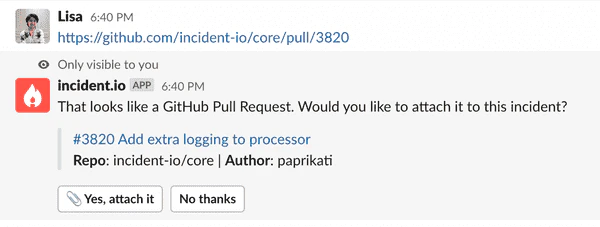
To attach something, you simply need to:
1. Make sure you're connected to the provider (e.g. GitHub) on the [integration settings](https://app.incident.io/~/settings/integrations) page
2. Paste a link into an incident channel, like below
3. Or, from the dashboard, use the **Links** action dropdown or the attachment drawer on the incident page
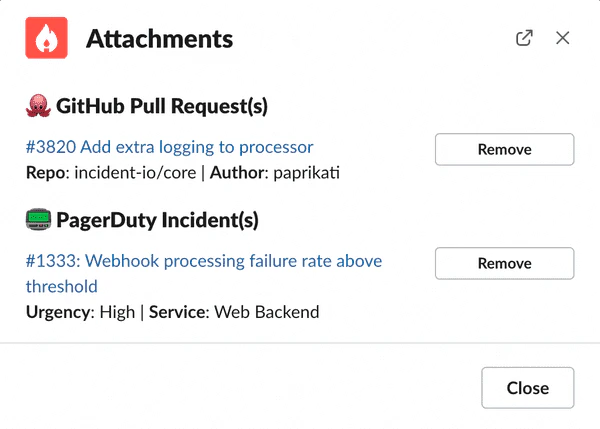
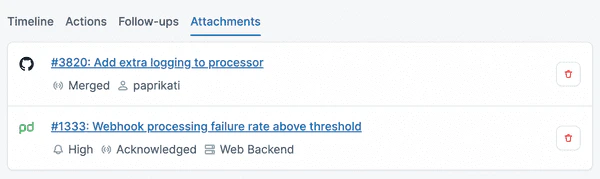
 You can view attachments in Slack (via `/incident attachments`) and in the Web UI:
 Once it's attached, we'll help you out wherever we can.
For example, if it's a GitHub PR, we'll comment on the PR (if it's in a private repo) with a connection back to the incident, so it's easy to find in the future:
Once it's attached, we'll help you out wherever we can.
For example, if it's a GitHub PR, we'll comment on the PR (if it's in a private repo) with a connection back to the incident, so it's easy to find in the future:
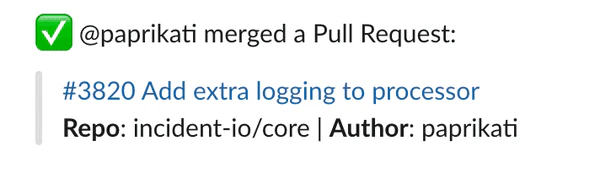
 Additionally, when a Pull Request gets closed or merged, we'll let you know in the channel:
 To start using the feature, set up your integration and paste a link into an incident channel. We'll do the rest!