> ## Documentation Index
> Fetch the complete documentation index at: https://docs.incident.io/llms.txt
> Use this file to discover all available pages before exploring further.
# Adding connected users to Catalog
Users of incident.io — your incident responders — are core to the incident management process. Those responders likely have accounts across many daily-use services, including services that you can (and should!) integrate with incident.io, like PagerDuty, Sentry, Linear and more.
Connecting third-party users to incident.io lets you build powerful integrations that *just work* with your existing tools - link Sentry users to identify the relevant people when you receive a Sentry alert and then notify them via Slack. The more you connect, the more you can do.
In most cases, when you connect a new integration, these *external users* will be added to Catalog and where we can, we'll link them to the relevant incident.io user via a *catalog attribute*.
To see this in action, navigate to the catalog type for an external user type (e.g. PagerDuty User) and click on any of the entries to see information about the external user, and the incident.io user that they're connected to.
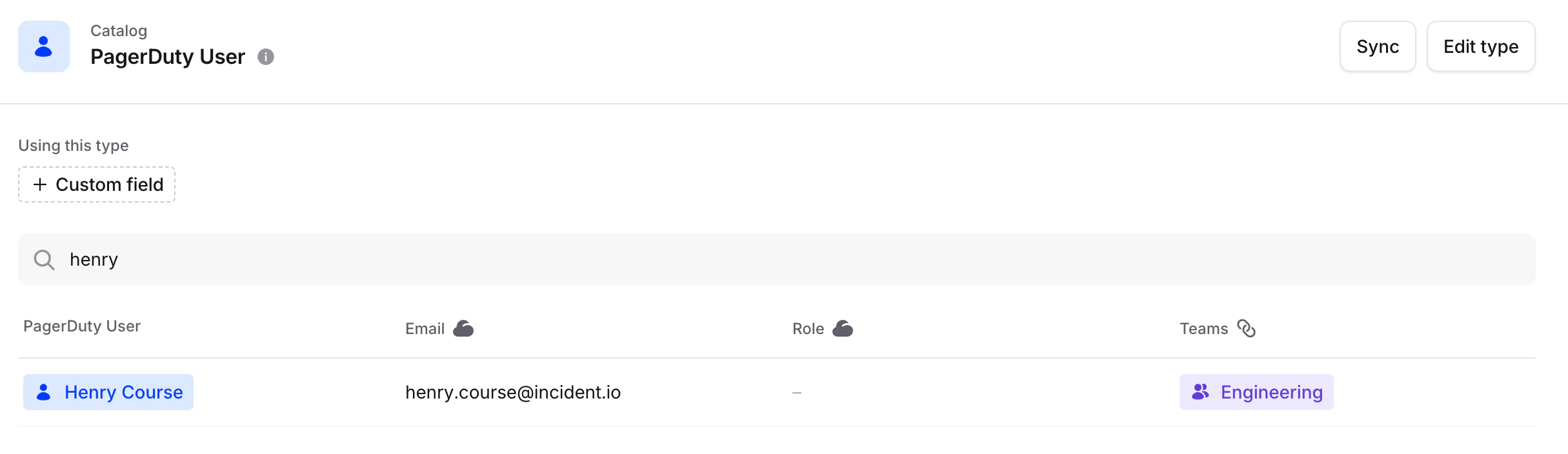 If an integration has a concept of users, we'll perform the import and link process automatically when you set up your integration.
Be aware that some integrations e.g. Github and Jira, don't support automatic user linking as we're not able to uniquely identify a matching user from an external user's email address.
If you need to create, edit or remove any connections between an incident.io user and a third-party user, you can do this via the *Users* catalog type. Click on the user you'd like to edit and use the *Connected accounts* list to manage connections.
## FAQs
These two areas of the product serve different purposes:
* **Settings → Users** is where you manage people who can sign in to incident.io and their permissions. You add users via Slack, SAML/SCIM, or manual invite, and assign roles (Standard, Admin, or Owner) along with any custom roles for access control. See [User management](/admin/user-management) and [User permissions](/admin/user-permissions) for more.
* **Catalog → User** is a catalog record that represents a person and can be linked to their accounts in other tools (e.g. Slack, Jira, GitHub, Notion, Salesforce). It's used to connect and reference external identities — you can manage these links via *Connected accounts* on the User catalog entry. See [Migrating teams and users](/catalog/migrate-team-users) for more.
Someone can appear in the User catalog type without being a signed-in user in Settings, and vice versa. If you're looking to manage who has access to incident.io, head to **Settings → Users**. If you're looking to link a person's external accounts, use the **User** catalog type.
If an integration has a concept of users, we'll perform the import and link process automatically when you set up your integration.
Be aware that some integrations e.g. Github and Jira, don't support automatic user linking as we're not able to uniquely identify a matching user from an external user's email address.
If you need to create, edit or remove any connections between an incident.io user and a third-party user, you can do this via the *Users* catalog type. Click on the user you'd like to edit and use the *Connected accounts* list to manage connections.
## FAQs
These two areas of the product serve different purposes:
* **Settings → Users** is where you manage people who can sign in to incident.io and their permissions. You add users via Slack, SAML/SCIM, or manual invite, and assign roles (Standard, Admin, or Owner) along with any custom roles for access control. See [User management](/admin/user-management) and [User permissions](/admin/user-permissions) for more.
* **Catalog → User** is a catalog record that represents a person and can be linked to their accounts in other tools (e.g. Slack, Jira, GitHub, Notion, Salesforce). It's used to connect and reference external identities — you can manage these links via *Connected accounts* on the User catalog entry. See [Migrating teams and users](/catalog/migrate-team-users) for more.
Someone can appear in the User catalog type without being a signed-in user in Settings, and vice versa. If you're looking to manage who has access to incident.io, head to **Settings → Users**. If you're looking to link a person's external accounts, use the **User** catalog type.