> ## Documentation Index
> Fetch the complete documentation index at: https://docs.incident.io/llms.txt
> Use this file to discover all available pages before exploring further.
# Catalog types and entries
> Let teams manage their own catalog types and entries
As you lean on the catalog as a source of truth, you often don't want everyone able to edit everything in it. Team ownership lets you hand each team control of the catalog types it's responsible for, without giving it the keys to the rest of the catalog.
For example, you might want only the platform team to edit the **Services** type. You do this by giving a catalog type an owning team, then granting the relevant catalog permission to that team's role.
## The permissions
Six catalog permissions can be granted on a team role, so they only apply to the types that team owns:
* **Create catalog types**, **Edit catalog types**, and **Delete catalog types** cover the types themselves
* **Create catalog entries**, **Edit catalog entries**, and **Delete catalog entries** cover the entries of any type the team owns
These permissions are **not** in the **Standard** role, so a catalog type with no owning team is managed only by people who hold the permission account-wide, exactly as today.
## Setting an owning team
Set a catalog type's owner in the **Catalog type owner** field when you create or edit a type in [**Catalog**](https://app.incident.io/~/catalog). You can assign more than one owning team.
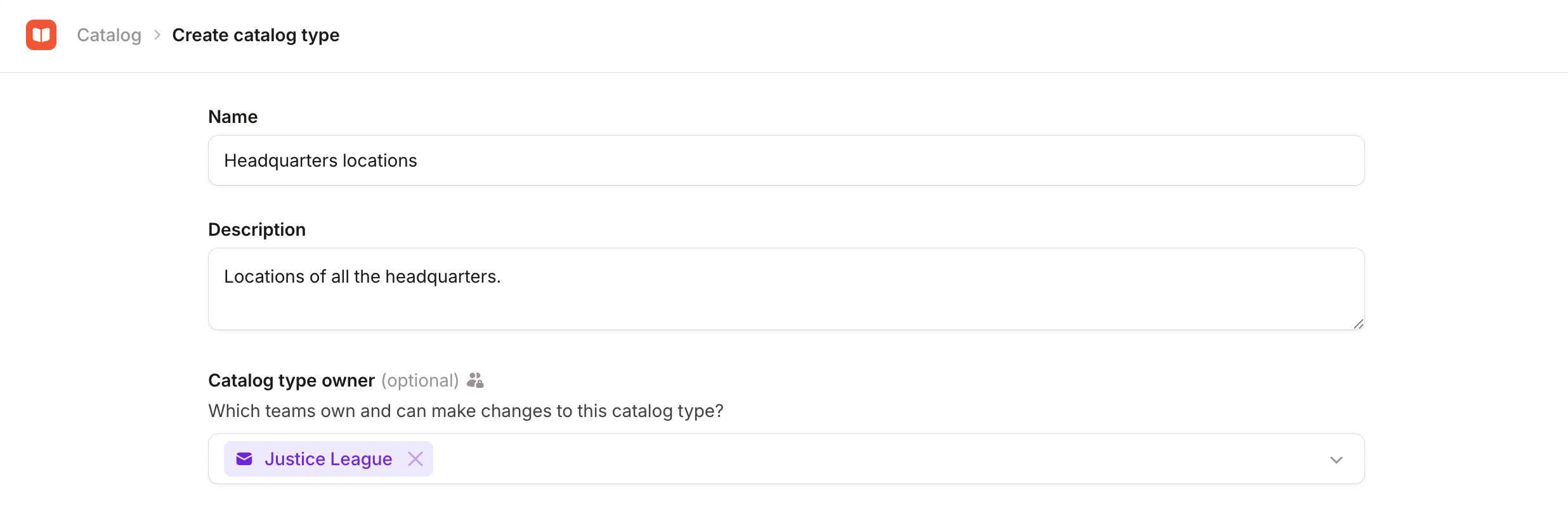 Once a type has an owning team, only members of that team with the relevant permission, or anyone who holds it account-wide, can change the type or edit its entries.
System-managed catalog types can't be owned by a team. Their structure is fixed by incident.io, so changes to them
always need the account-wide permission.
## Example: letting a team manage its own services
Say you want the platform team to own the **Services** type: they should be able to create, edit, and delete service entries, but no one outside the team should be able to change them.
1. In [**Catalog**](https://app.incident.io/~/catalog), open the **Services** type and set the **Catalog type owner** to the platform team.
2. At [**Settings → Permissions → Team-level**](https://app.incident.io/~/settings/permissions/team), create (or edit) a team role that includes the **Edit catalog entries** permission (add the **Create catalog entries** and **Delete catalog entries** permissions if they should manage the full set).
3. On the platform team's **Members** tab, assign that role to the people who should manage services.
Now the platform team manages the Services type and its entries, while everyone else sees those controls disabled with a tooltip explaining they don't have permission. See [Team roles](/admin/team-roles) for the general setup and how to remove any account-level default that would otherwise let everyone edit.
## FAQs
Reassigning ownership always requires the **Edit catalog types** permission granted account-wide. A team can manage
a type they own and its entries, but they can't hand the type to another team or remove their own team from it.
Nothing changes for them. They can only be managed by people who hold the relevant catalog permission account-wide,
the same as how every catalog type behaves today.
Yes. You can assign multiple owning teams, and a member of any one of them (with the permission granted to that
team) can manage the type and its entries.
Both GitHub and Terraform can define the owning teams for a catalog type as part of their config, so
externally-managed types can be team-owned just like ones you create in the dashboard, and their entries are gated by
that ownership.
You can also restrict which types a given integration can modify by giving its API key only team-scoped catalog
permissions. A key with team-scoped permissions can create, edit, and delete types (and their entries) for the teams
it's scoped to, but nothing else. See [API keys](/admin/api-keys) for how team-scoped permissions work.
Yes. Anyone who holds the permission account-wide can manage any catalog type or entry, regardless of which team
owns it.
Once a type has an owning team, only members of that team with the relevant permission, or anyone who holds it account-wide, can change the type or edit its entries.
System-managed catalog types can't be owned by a team. Their structure is fixed by incident.io, so changes to them
always need the account-wide permission.
## Example: letting a team manage its own services
Say you want the platform team to own the **Services** type: they should be able to create, edit, and delete service entries, but no one outside the team should be able to change them.
1. In [**Catalog**](https://app.incident.io/~/catalog), open the **Services** type and set the **Catalog type owner** to the platform team.
2. At [**Settings → Permissions → Team-level**](https://app.incident.io/~/settings/permissions/team), create (or edit) a team role that includes the **Edit catalog entries** permission (add the **Create catalog entries** and **Delete catalog entries** permissions if they should manage the full set).
3. On the platform team's **Members** tab, assign that role to the people who should manage services.
Now the platform team manages the Services type and its entries, while everyone else sees those controls disabled with a tooltip explaining they don't have permission. See [Team roles](/admin/team-roles) for the general setup and how to remove any account-level default that would otherwise let everyone edit.
## FAQs
Reassigning ownership always requires the **Edit catalog types** permission granted account-wide. A team can manage
a type they own and its entries, but they can't hand the type to another team or remove their own team from it.
Nothing changes for them. They can only be managed by people who hold the relevant catalog permission account-wide,
the same as how every catalog type behaves today.
Yes. You can assign multiple owning teams, and a member of any one of them (with the permission granted to that
team) can manage the type and its entries.
Both GitHub and Terraform can define the owning teams for a catalog type as part of their config, so
externally-managed types can be team-owned just like ones you create in the dashboard, and their entries are gated by
that ownership.
You can also restrict which types a given integration can modify by giving its API key only team-scoped catalog
permissions. A key with team-scoped permissions can create, edit, and delete types (and their entries) for the teams
it's scoped to, but nothing else. See [API keys](/admin/api-keys) for how team-scoped permissions work.
Yes. Anyone who holds the permission account-wide can manage any catalog type or entry, regardless of which team
owns it.